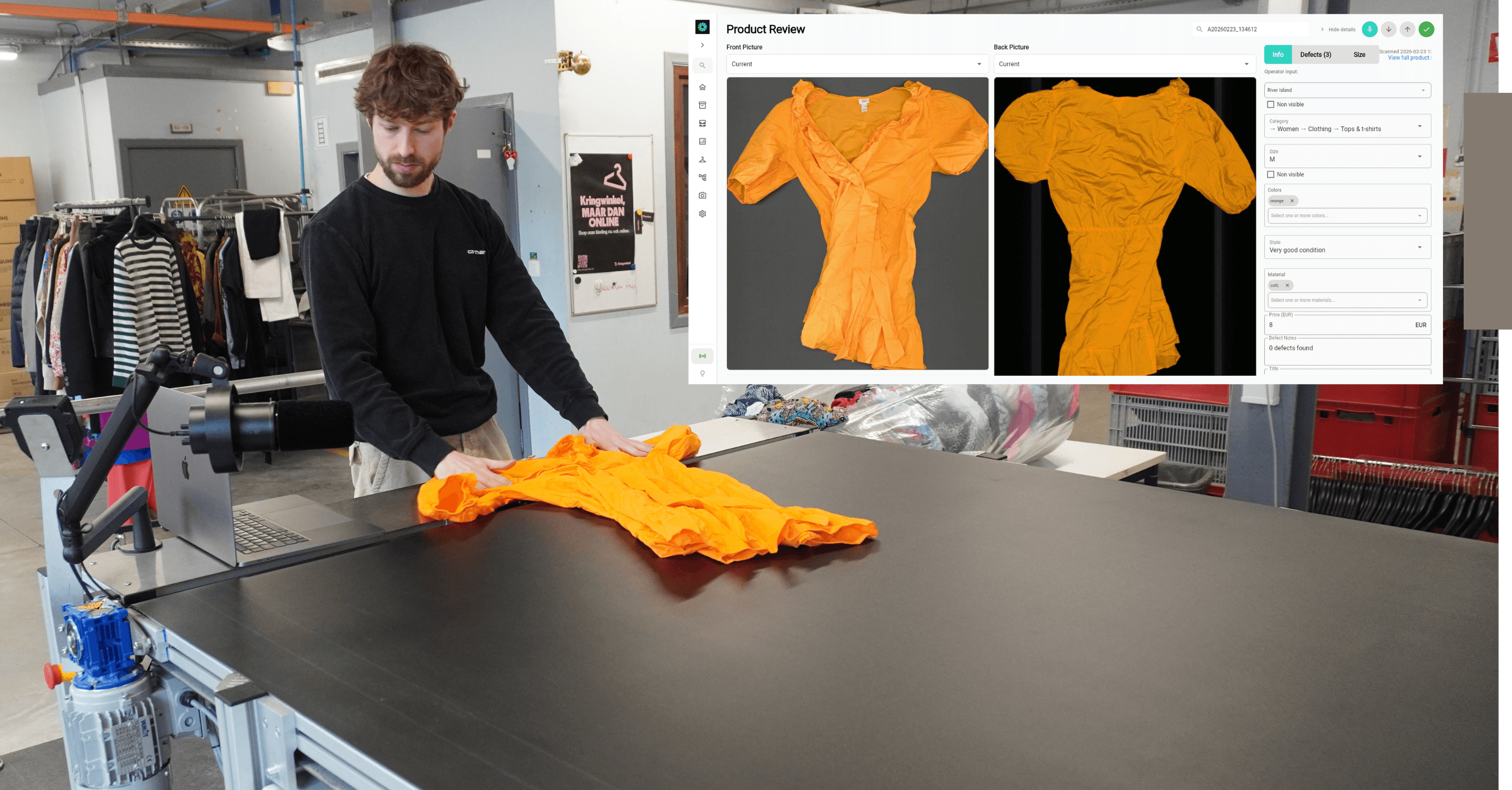

In short: For a French brand logistics provider, every garment fed into our system is scanned, matched to its barcode and sorted into the right category, for example restock, repair or recycling. SortMate then labels it, tracks it into a bale and seals the bale under its own SSCC (Serial Shipping Container Code) number, which is registered in their warehouse management system (WMS) automatically. Nobody retypes a thing.
SortMate is Trosort’s AI sorting line. The operator scans the garment’s barcode, a near-infrared (NIR) sensor reads its material, and cameras scan the front and back as it moves along the belt. A label prints right after the scan, and compressed-air ejectors send the garment into the right bale.
Our customer is a French logistics provider for fashion brands. It plans to put more than 100,000 garments a month through SortMate, so every step after the scan has to run without anyone retyping data.
Here is what that changed in practice:
From minutes to 6 seconds: each garment is now sorted and registered in the WMS every 6 seconds, instead of several minutes by hand.
One record per garment: its barcode stays linked to its photos, size, material and defects, from the first scan to the WMS.
A label on every garment, with its barcode, reference and the data SortMate detects, such as category, colour and material, printed and applied on the moving belt.
Proof of what landed in each bale, recorded garment by garment.
Every closed bale registered in the WMS automatically, with its own SSCC barcode.
The Challenge: Keeping Every Garment Traceable
Brand logisticians handle returns, excess stock and surplus for fashion brands. Every item has to land in the WMS with the right references, its characteristics and the unit it was packed in. Without automation, that means reading tags, typing data and labelling items one by one.
That was our customer’s situation before SortMate. Every garment was labelled by hand and keyed into the WMS by hand: slow, painful work that took several minutes per garment.
Our customer wanted the opposite: garments that carry their own data from the first scan to the shipped bale, and bales that are registered in their WMS automatically.
How It Works, in Five Steps

Step 1: Barcode and Garment Scan
1A: Barcode scan
The operator first scans the barcode on the garment’s tag. From that moment, everything SortMate learns about the garment stays linked to that barcode, all the way to the WMS.
One reference. The customer’s article number (SKU) and the barcode on the tag (EAN) are saved together as one reference. If no barcode can be read, SortMate creates its own reference from the scan date and time, so no garment is ever anonymous.
Same ID everywhere. The label, the bale, the Trosort web app and the WMS file all point to that same reference.
1B: Garment scan
The operator then holds the garment over the NIR sensor, which measures its material, and lays it on the conveyor belt, where cameras take over.
Everything captured in one pass. Cameras capture the front and back of the garment, read its size and colour, and detect defects. A near-infrared (NIR) sensor measures the fabric composition, so the material comes from a measurement, never from a visual guess.
Voice notes. An optional foot pedal lets the operator dictate a note, such as a brand or size, which is transcribed and attached to the garment.

Step 2: Automated Labelling
SortMate’s automated label printer sits on the sorting conveyor. It prints the garment’s label and applies it while the garment keeps moving, with no operator handling. The label carries the barcode, the reference and any characteristic SortMate detects, such as category, colour, material or price.
Timed to the garment. SortMate tracks every garment along the belt, so the label lands on the right piece at any belt speed.
Never on the wrong garment. A label that would arrive late is dropped rather than applied to the next item, and a belt stop cancels every pending label.
Step 3: Sorting Into 10 Bins
The customer’s sorting scenario decides which bale each garment goes to. SortMate then makes sure it physically gets there, and records whether it did.
The categories and rules shown here are a simplified example, not the client’s real sorting set-up, which stays confidential.
Ten bale positions. Each has a sensor and a compressed-air ejector that fires when the tracked garment arrives.
A rule for every garment. Each garment’s record shows which sorting rule was applied to it and which bale it was sent to, as in the record shown in Step 1B.
An outcome per garment. Ejected into its bale, passed through, or missed: every garment’s record says whether it is inside the bale.
Full-bale warning. When a bale is full, the light bar on the machine flashes orange so operators see it from the floor.
Step 4: Bale Closing
When operators swap a bale, they close it in the Trosort web app. Closing seals every garment of the bale, with all of its data, as one record.

Review. The app lists the garments that went into the bale, with their pictures. Only garments confirmed inside the bale count.
Confirm. The operator confirms the list. That exact list is what gets sealed.
Publish. SortMate sends the bale’s content to the WMS and receives the bale’s SSCC number back.
Seal. Each garment gets the bale ID, the bale counter restarts at zero and the bale label is printed.
If anything fails, such as a missing garment or a WMS error, the bale stays open and nothing is sealed. The operator sees the reason and can try again.

Step 5: Bale Identification (SSCC)
Each closed bale gets its own SSCC (Serial Shipping Container Code), the GS1 standard identifier for a logistics unit. It combines the customer’s GS1 company prefix with a bale counter that only goes up, plus a check digit that catches any misread number. SSCC is a global GS1 standard; for a client that doesn’t use GS1, SortMate can use the WMS’s own container ID instead.

The bale sheet shows the SSCC as a barcode, with the list of every garment inside. The same SSCC is written on every garment of the bale, so the customer can go from a scanned bale to each garment, and back from any garment to its bale. The sheet is printed only after the WMS has accepted the content, so a printed SSCC always matches a registered bale.

WMS Integration
On every bale close, SortMate sends the WMS one line per garment, in the customer’s own format. We refined it together over several feedback rounds.

Exactly what was sealed. The WMS receives all the confirmed garments, or nothing at all.
The customer’s rules. Codes come from the sorting scenario actually used, sensor glitches never appear as defects, and materials come from the NIR measurement only.
Safe to retry. If the WMS is unreachable, nothing is marked as published and no number is lost.
From Several Minutes to 6 Seconds per Garment
Before SortMate, labelling and registering a garment took several minutes of manual work. Now the line sorts a garment and registers it in the WMS every 6 seconds, with nobody typing anything.
Speed. One garment sorted, labelled and in the WMS every 6 seconds, instead of several minutes per garment.
Data that travels on. The logistician can pass each garment’s data on to its own clients, the fashion brands.
Proof of the work done. Every bale comes with the list of garments inside it, so the logistician can show its clients exactly what was processed.
Making It Fit Their Process and Their Barcodes
The hardest part was not the machine itself, but fitting SortMate into the way our customer already worked.
Three barcodes, one record. Each garment arrives with the brand’s EAN, the logistician uses its own SKU, and each bale gets an SSCC. We had to bring all three together, so the same garment can be found by any of them, in the web app and in the WMS.
Labels for every kind of garment. The automated label printer had to handle a very wide variety of items and still place the label right on each of them.
Built into their process. SortMate had to slot into the customer’s existing workflow. The WMS format was refined together with their team over several feedback rounds, until it fit their daily routine.
What This Looks Like in a 3PL Returns Flow
The building blocks above are not tied to one customer. A 3PL handling fashion returns uses the same line in a slightly different order:

Scan the box. The return parcel’s barcode links every garment inside to its order.
Open and feed. An operator opens the box and lays the garments on the belt, one by one.
Check quality and possible fraud. SortMate identifies each item and can flag one that doesn’t match the order, shows signs of wear or is missing its tags.
Decide per item. At the end of the line, good items are repacked and sent back to stock. The rest goes to repair, washing or recycling, following the client’s own categories.
Update the WMS. Every decision is recorded per item, so stock and returns data stay accurate without retyping.
Conclusion: Traceability From Belt to Bale
Every garment carries its own data from the first scan, every bale is registered in the WMS as a logistics unit, and nobody retypes anything in between. What the logistician gained with Trosort:
A garment sorted and registered in the WMS every 6 seconds, instead of several minutes by hand
Garment data captured once, at the scan, and never retyped
A label printed and applied on the moving belt
Proof of which garments landed in which bale
Bales registered in the WMS automatically, each with its own SSCC
The same building blocks (identification, automated labelling, sorting and WMS integration) work for any returns, surplus or resale flow. Want to see how SortMate would plug into your WMS? Book a call.
FAQ
What is SortMate, the machine used in this case?
SortMate is an AI sorting line built by Trosort. It scans each garment, identifies it, prints and applies its label, and sorts it into the right bale.
Can SortMate send garment data to a warehouse management system?
Yes. Every time a bale is closed, SortMate sends the WMS one line per garment in the customer’s own format, with references, characteristics, materials, defects and the bale’s SSCC.
What is an SSCC, and why does each bale get one?
An SSCC (Serial Shipping Container Code) is the GS1 standard identifier for a logistics unit. Giving each bale its own SSCC lets the customer trace a bale to every garment inside it, and any garment back to its bale.
How does the label end up on the right garment on a moving belt?
SortMate tracks each garment’s position along the belt and times the label to it. A label that would arrive late is dropped rather than applied to the next garment.
What happens if the WMS is unreachable when a bale is closed?
The bale stays open and nothing is marked as published. No bale number is lost, so the operator can simply close the bale again.
Can SortMate check returned items for fraud?
It can flag returns that look suspicious: an item that doesn’t match the order, signs of wear, or missing tags. The operator then decides what happens next.